Claude Code Guide to GTM
How we build a full go-to-market system on Claude Code at Zevenue - the six building blocks (skills, subagents, hooks, MCP, plugins, routines) mapped to every stage of GTM. The written companion to our Claude Code Masterclass.
 Zevenue
Most teams that say they’ve gone “AI-native” mean they use AI to write their emails or clean up a draft. That was the frontier in 2023. It isn’t anymore.
The bottleneck in go-to-market is no longer how good the model is. Every frontier model is smart enough to do the work. The limiting factor now is whether you can take the building blocks Claude Code gives you - skills, subagents, hooks, MCP, plugins, and routines - and compose them into a system that runs your GTM and gets better every week.
There are things a small team can do today that would have taken strenuous effort six months ago. This guide is how we build a full GTM system on Claude Code at Zevenue, one layer at a time. It’s the written companion to our Claude Code Masterclass.
Two vocabularies, one map
There are two sets of terms you need, and the whole point of this guide is that they line up.
The first is the six Claude Code building blocks:
- Skills - reusable, versioned prompts that encode how you do a specific task
- Subagents - assistants that run their own research in their own context window and hand back only the result
- Hooks - deterministic rules that fire at fixed points (before a tool call, after one, at the end of a session)
- MCP - a protocol for connecting Claude to your external tools and data
- Plugins - bundles that package skills and configuration so a team can install them in one line
- Routines - scheduled runs that execute a task on a recurring cadence
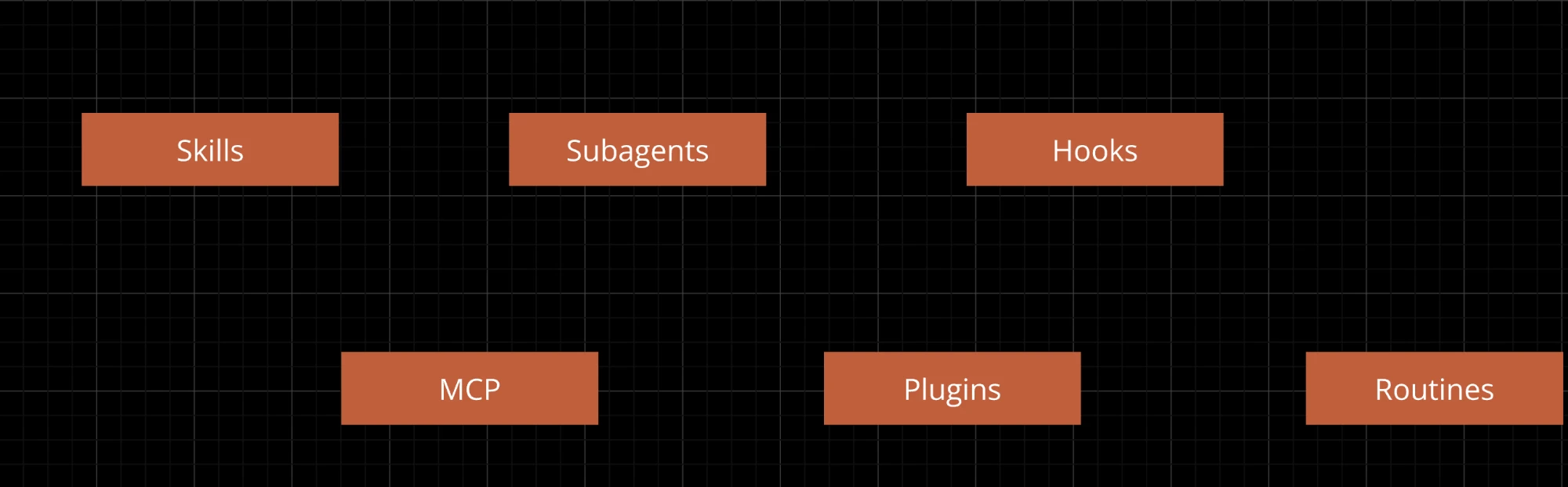
The six building blocks.
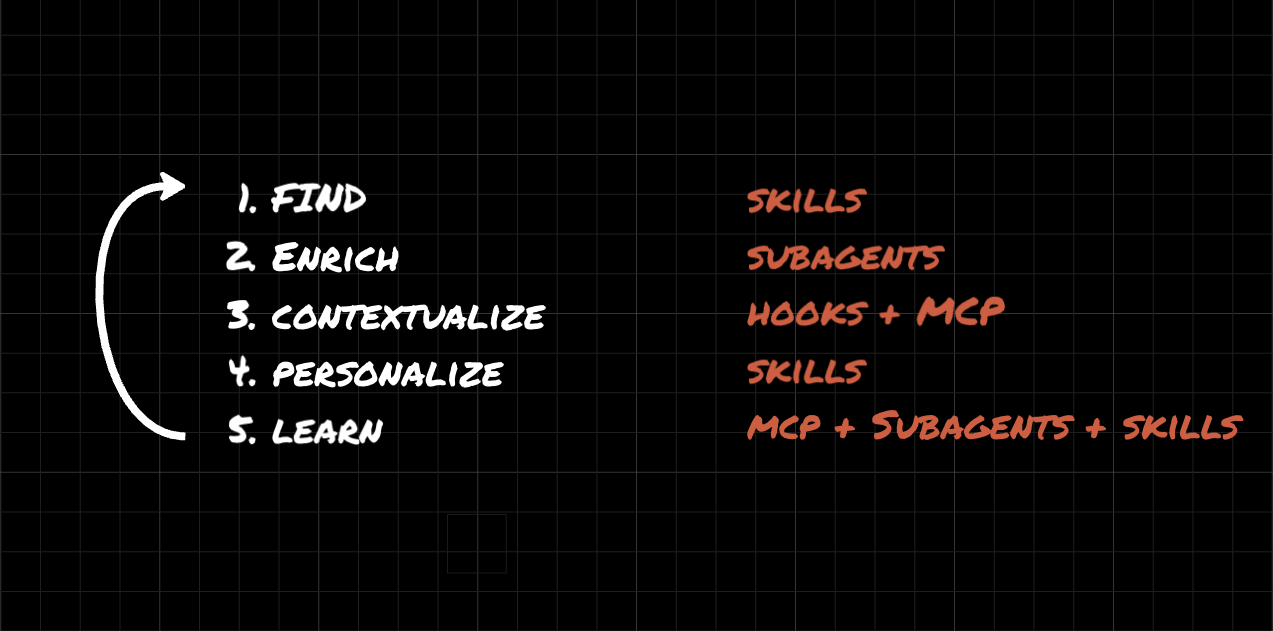
The second is the shape of GTM work. Strip it down and it’s five stages: you find your market, you enrich it, you add the relevant context, you personalize your outreach, and you improve from what you learn.
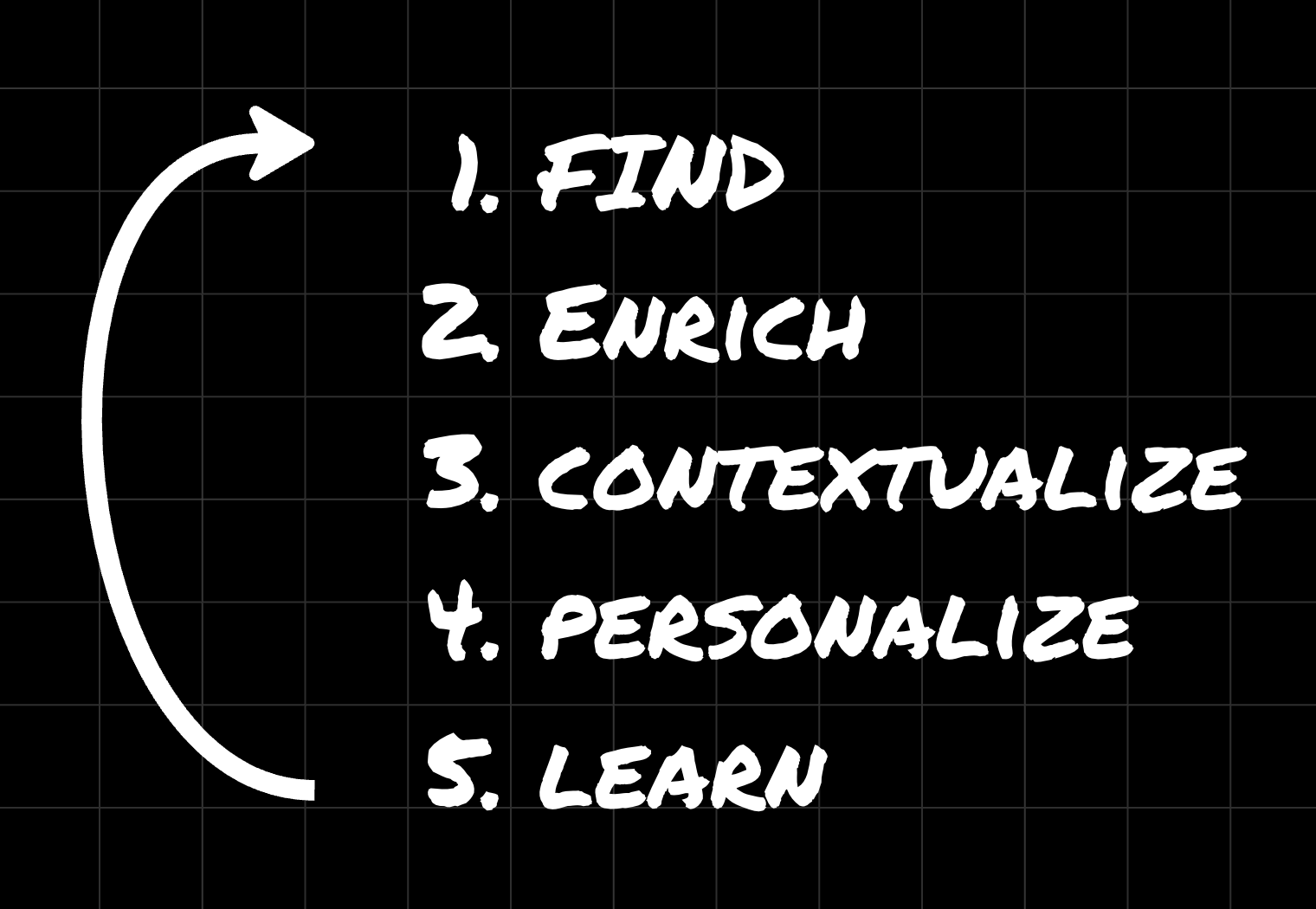
The five stages of the GTM workflow.
Each stage has a building block that fits it. That mapping is the system:
| GTM stage | What it answers | Building block |
|---|---|---|
| Find | Who do we go after, and why now? | Skills |
| Enrich | What’s true about them, at scale? | Subagents |
| Contextualize | What do we already know, and where does it live? | Hooks + MCP |
| Personalize | What do we actually say? | Skills |
| Improve | What’s working, and what should change? | /goal loops |
| Schedule | How does this run without me? | Routines |
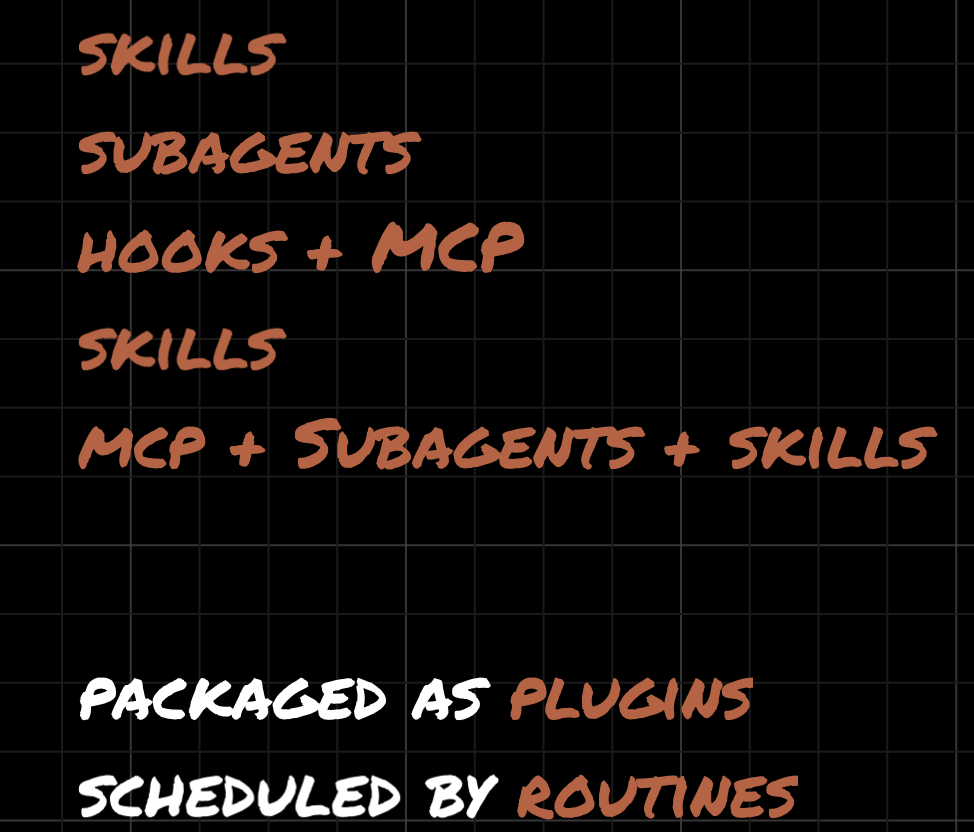
The mapping, stage by stage - then packaged as plugins and scheduled by routines.
The rest of this guide walks each layer. We’ll use one running example: Cents, the software company that raised $140M to sell to laundromat owners. Companies like Cents do their best work with a real sales motion aimed at a non-obvious customer - laundromat owners, salon owners, HVAC operators - the kind of end customer you can’t pull off a title-based database. That makes them a good stress test for every layer below.
Layer 1: Find (skills)
People think “find” means “who do I talk to.” The real question is how deep and how unique your targeting can be. You don’t get that by downloading the same list everyone else is paying $100 a month for. You get it from a process built on context that’s specific to you.
That’s what a skill is for. We have a signal-builder skill that reads a prospect’s website and enrichment data and ranks the signals that make them a fit for us. Under the hood it’s powered by Firecrawl, which scrapes web pages precisely enough to catch things generic tools miss. It loads our client context, walks specific pages, and pulls out signals - the work a sales rep used to do by hand, slowly.
Run it on Cents and you don’t get “they raised money.” You get the useful version: they’re expanding into four new verticals, their GTM leadership is in transition, they’re actively hiring a VP of Marketing, and they recently shipped an AI feature (which you can tell from a specific post by their CEO, not from their homepage). If you typed “find unique signals about this company” into a blank session, you would not get this. The quality comes from the skill being trained on what a good signal looks like for us.
How to build a skill the right way
A year ago you built skills by hand, reading advice on file structure and how to test them. You don’t do that anymore. Anthropic shipped a /skill-creator command, and it runs four agents under the hood:
- One generates and runs the skill
- One evaluates the output against what you said you wanted
- One runs a blind A/B test between versions
- One analyzes the results and suggests improvements
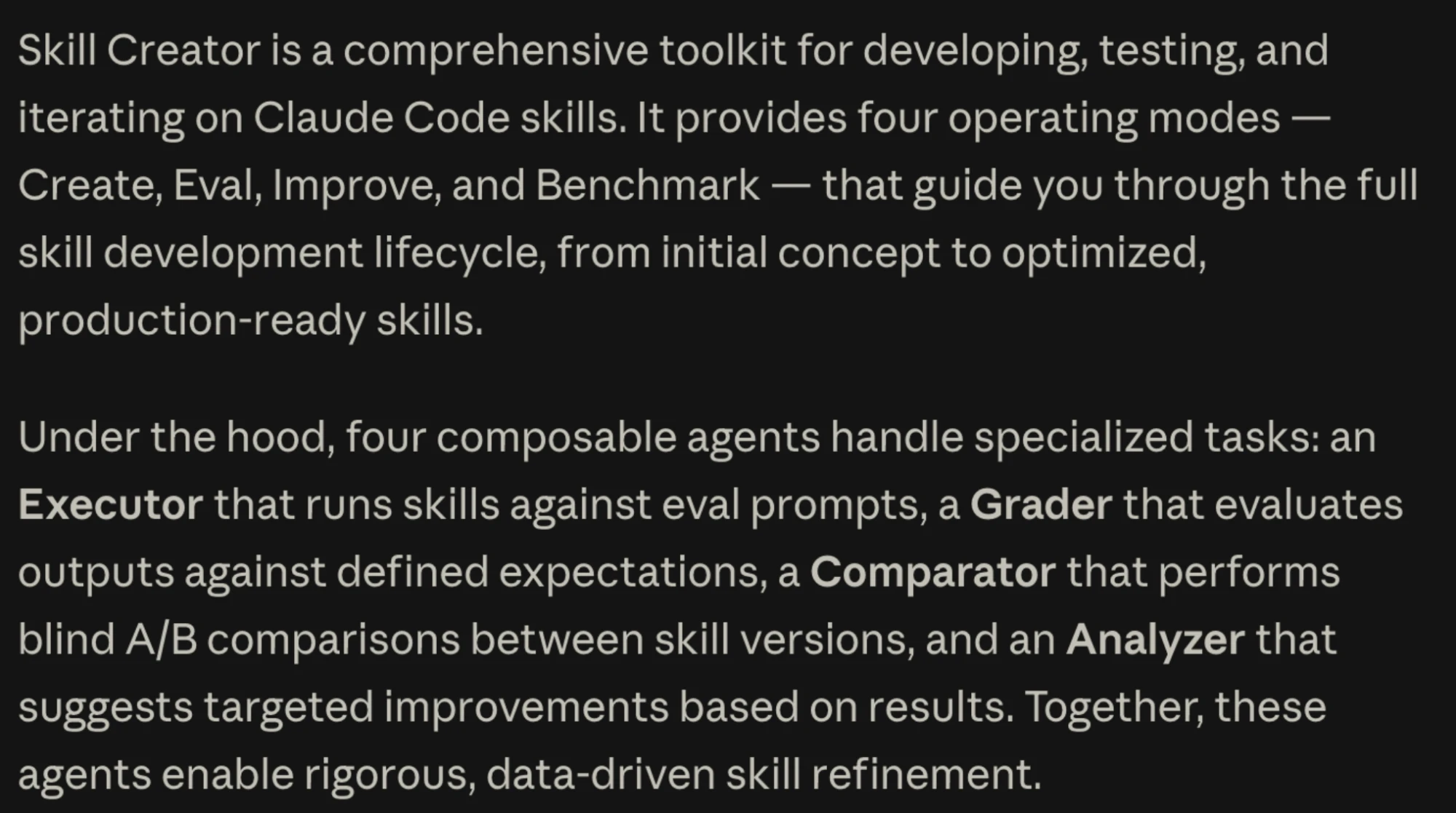
The Skill Creator’s four agents - Executor, Grader, Comparator, Analyzer - test and refine a skill on their own. Source: Anthropic’s Skill Creator.
It tests its own work and iterates. We don’t write these by hand. In the masterclass I build a new reply-triage skill live to replace an old n8n workflow that classified inbound replies - I describe the output I want, the categories, and the rules, and the skill-creator produces the skill plus a separate categories file. It even worked out things I didn’t ask for: strip the signature block, weight the strongest signal (an unsubscribe request outranks a throwaway “happy Friday”).
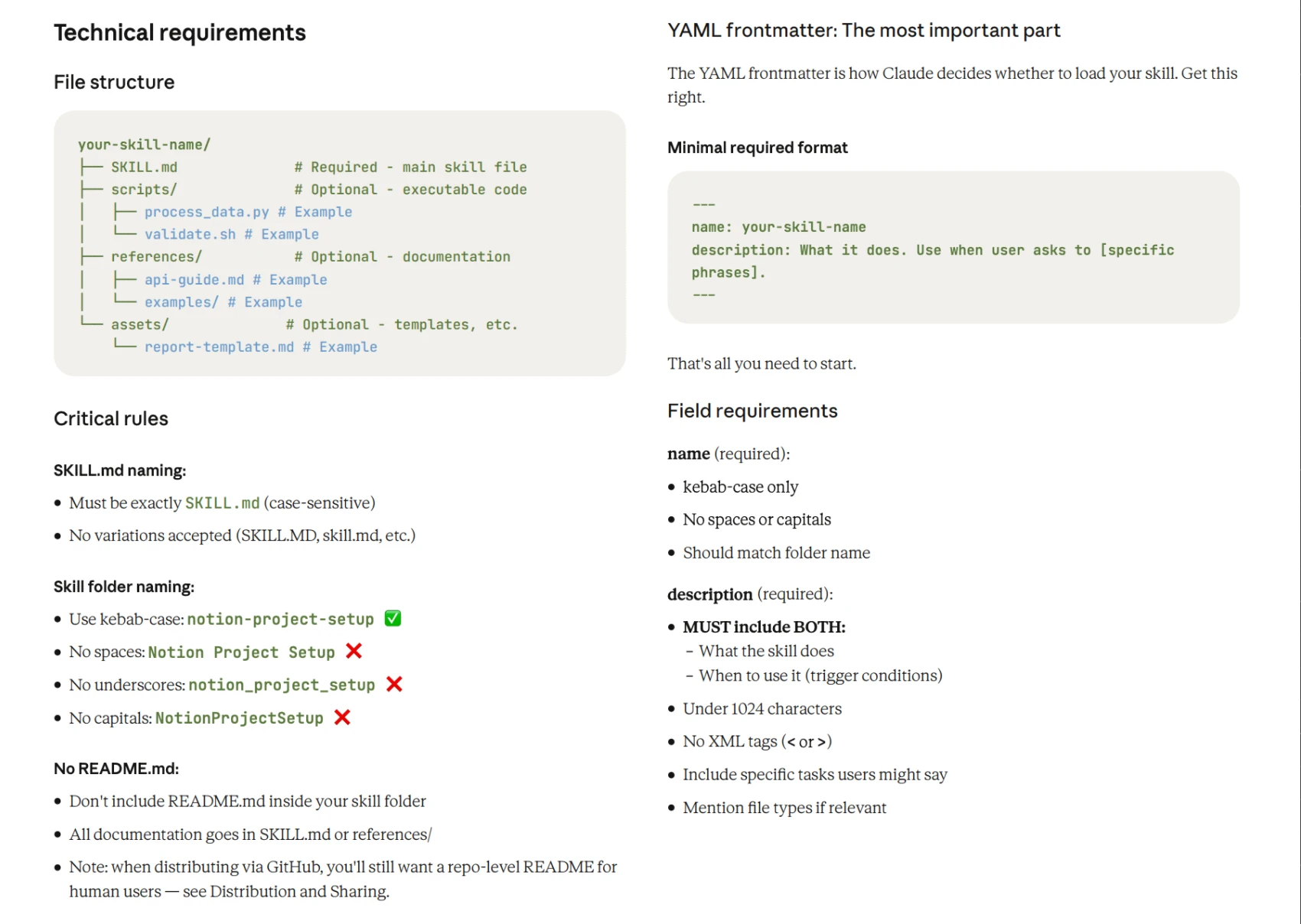
The anatomy of a skill: the required file structure and the YAML frontmatter that decides when Claude loads it. Source: Anthropic’s Skill Creator.
The principle underneath this layer: build once, use many times. A skill is the highest-leverage way to capture how your team works. If you’re moving past the wiki, the two-hour Loom, and the ten-page SOP, the destination is a reusable workflow - and the best way to build one is the same way Anthropic builds theirs.
This also scales in a way a table never did. We’ve run signal-builder across 16,000 prospects in about 40 minutes. A Clay table or an Apollo list is static - you build it once and it’s hard to repeat. A skill is an SOP you run again and again, and it carries intelligence forward instead of freezing it in a CSV.
Layer 2: Enrich (subagents)
Now take those signals and run them across a whole list, not one company.
The wrong way is the 2023 way: open one session, ask it to research Company A, then B, then C, then D. Eventually the output degrades because you’ve filled the context window with everything from every company. That’s context pollution, and it’s the single most common reason people burn through their session limits.
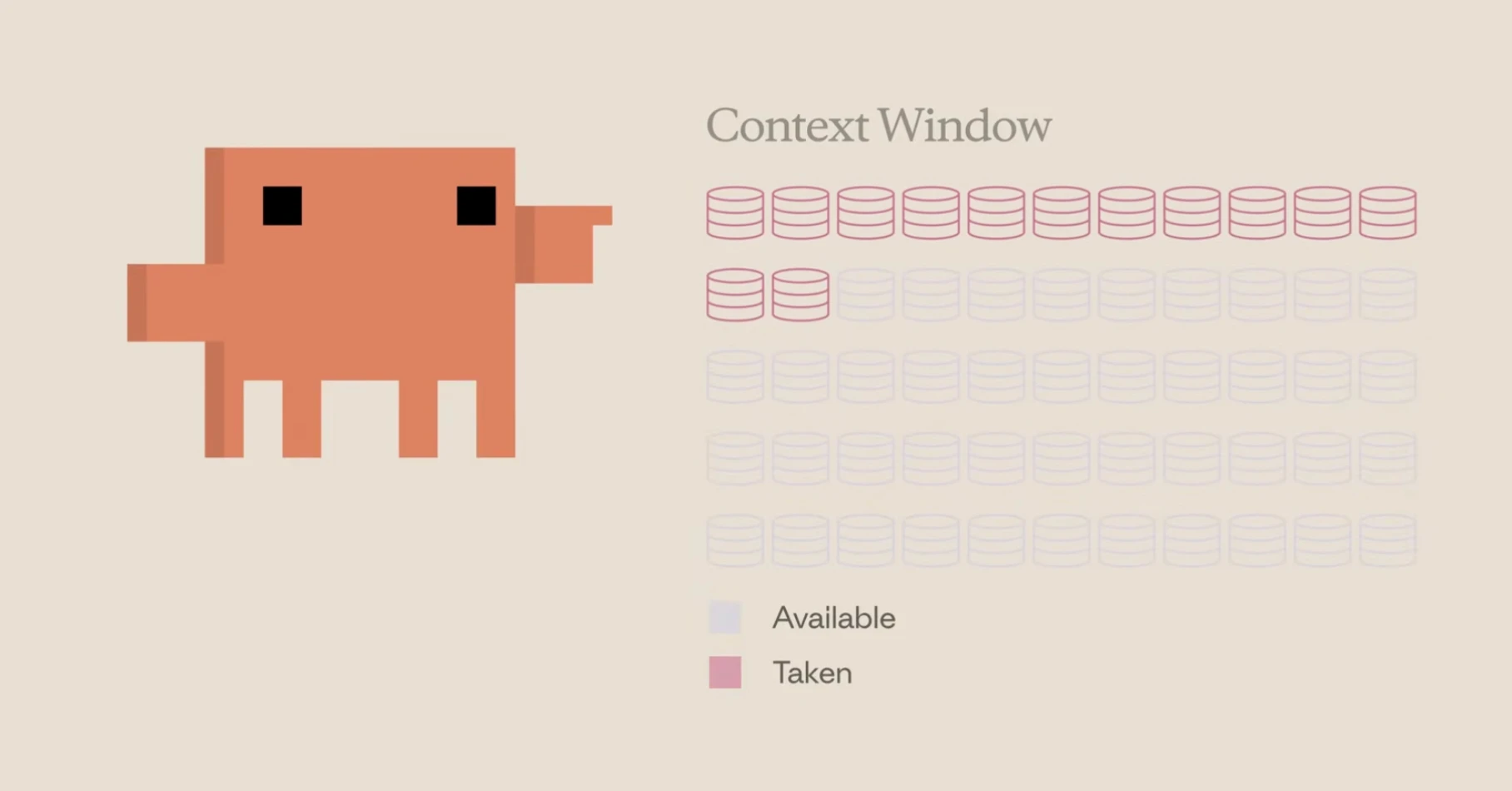
A single session’s context window fills up fast when one agent does all the work.
Subagents fix this. A subagent runs its own research in its own context window and returns only its summary to your main session. The heavy tokens - loading the website, reading the funding history, scanning LinkedIn posts - are spent in the subagent, not against your session. Research tasks are exactly where subagents perform best.
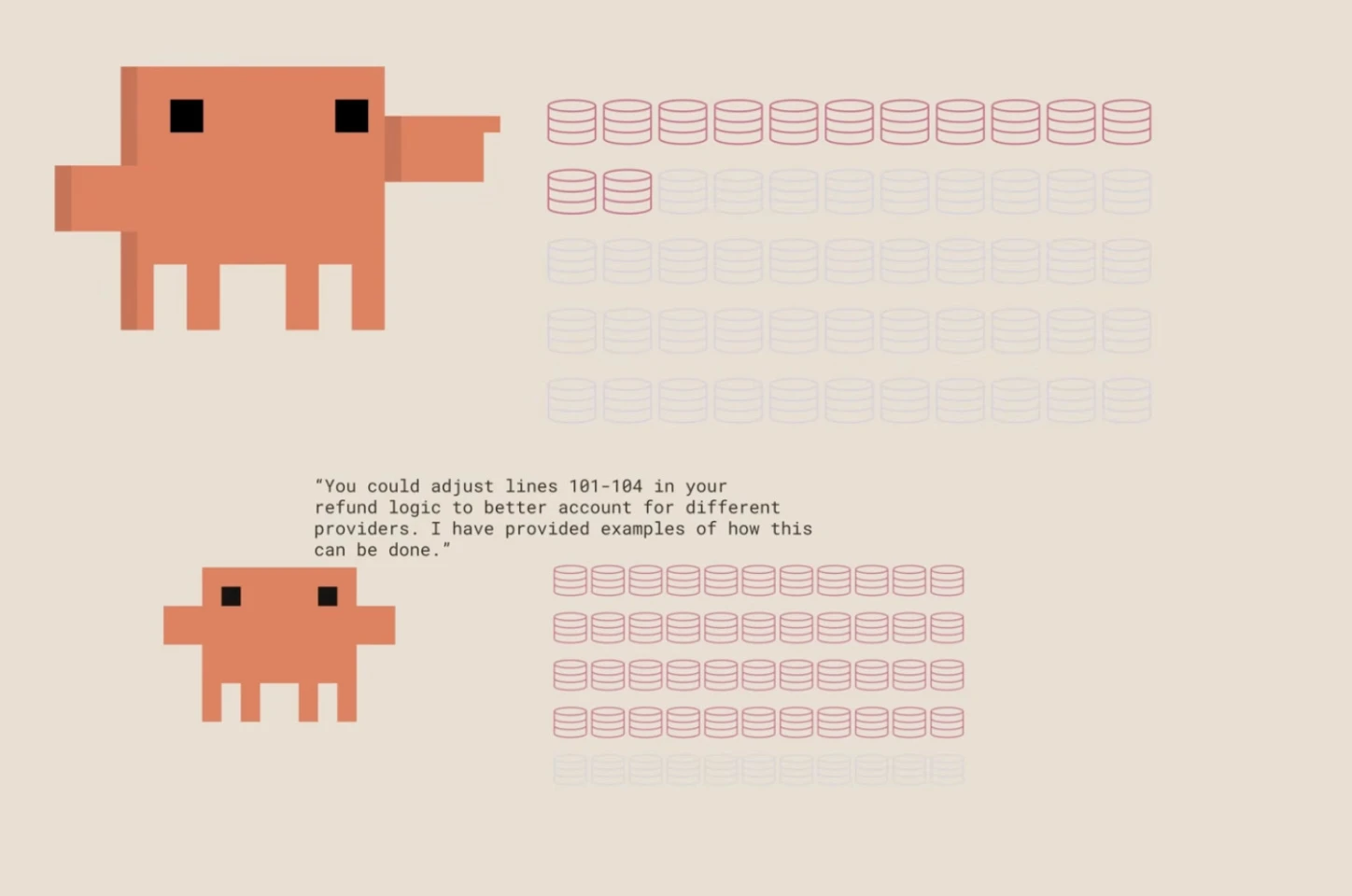
The subagent does the heavy work in its own context window and hands back only a short summary. Source: Anthropic Academy: Introduction to subagents.
So instead of one session grinding through 20 companies, you dispatch a fleet. In the masterclass I take a 20-company target list and spin up four subagents per company - one each for AI priority, funding history, tech stack, and hiring signals - across five companies at once. Twenty parallel agents, one prompt. Each one feeds a short summary back to the main context.
The depth is the payoff. One subagent came back with a company’s open GTM-engineer requisition listing the exact tools they expect that hire to use - Salesforce, Clay, Outreach. A single session researching 20 companies at once would tell you “yes, we did the research,” but it could never hold that much detail. A dedicated subagent whose only job is that one signal can.
Two practical notes:
- The context window grew from 200K to a million tokens, but don’t use a million tokens. Accuracy degrades as the window fills. We keep sessions under 200K where we can, and subagents are how.
- In the Claude Code desktop app there’s a tasks view where you can watch subagents run and click into any one to check its output live. You don’t have to wait for all 20 to finish to see how the work is going.
Once you see it, you can’t un-see it: every list-shaped task is a fanout. Score, enrich, summarize, personalize - all of it wants subagents.
Layer 3: Contextualize (hooks + MCP)
This is the biggest bottleneck we see non-technical teams hit: getting the right context to the model at the right time.
The old world is siloed. Your data is trapped in Salesforce, in Clay, in your sending tool, in the head of a sales-enablement hire who then leaves for another company. Nobody can find anything. The fix is to make the context Claude needs available at the moment it needs it, and there are four ways to do it.
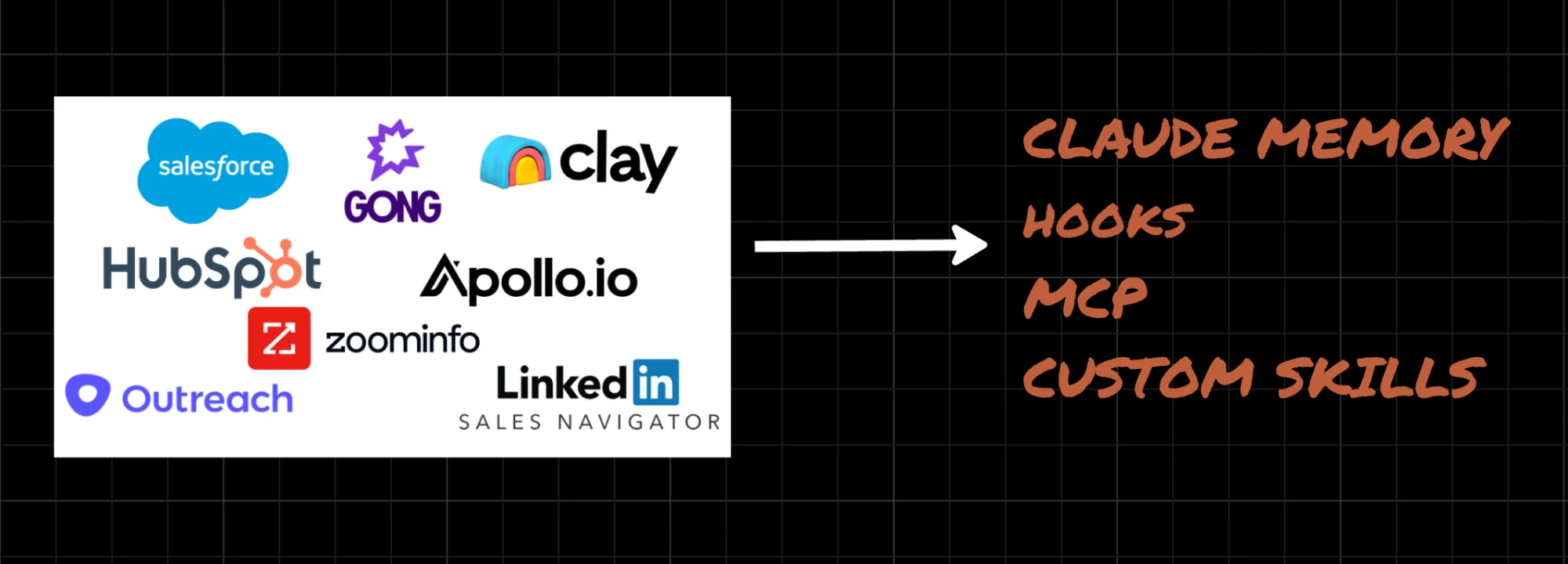
Context is trapped across a dozen tools. Four mechanisms pull it in at the right time.
1. Claude memory. Write a solid CLAUDE.md file. Every session reads it first. It sets the structure and points Claude at where things live. Combined with an organized file layout, this is the foundation everything else sits on.
2. Hooks. A hook is a deterministic rule that fires at a fixed point - before a tool call, after one, at the end of a session - and does the same thing every time. It doesn’t think; it just runs. One we rely on: any time a word in the prompt matches a client or prospect folder, that folder gets loaded. When I mention Cents, the Cents folder is already in context. Claude never has to search the repo to find it, because a regex match forced the load. That’s the value of a hook - you take a behavior you want to happen every single time and make it certain rather than probable.
3. MCP. We record every sales call in Fathom. Through an MCP server, every call Zevenue has had over the last few years is pulled in and sorted into a folder per prospect, with a dated markdown file (summary plus full transcript) for each call. So when I ask for three pain points from a call I had in March with a specific prospect, the call is already there. I don’t dig through recordings or spend tokens searching for the right one. I reference the prospect and the month, and the context is live. (In the masterclass this runs against an anonymized call - a real conversation with the names and deal details scrubbed.)
4. Context-gathering skills. Sometimes you want more than your own records - you want the prospect’s own words. Our prospect-posts skill pulls recent LinkedIn posts from specific people at a target account. If you’re reaching a CEO cold, the best source is what they’re saying publicly. Run it on Cents and you get the language their SVP of Sales uses, the specific intent behind their expansion, and how each leader differs in what they care about. Good outreach speaks the prospect’s language, and this feeds you that language directly.
The through-line: you want the most relevant context you can assemble - internal and external - available on demand, without stuffing it all into one window.
Layer 4: Personalize (skills)
Here’s the trap. When people in sales and marketing say they’re “doing AI for GTM,” they usually mean AI writes their emails. That’s a small layer, and it’s the wrong thing to fixate on.
We put personalization fourth on purpose. The hard work is upstream. By the time you’re writing the email, the targeting, the enrichment, and the context are already done - the message practically writes itself from what you’ve assembled. Claude has always been a good writer. That was true in 2023. It’s not the unlock.
There is still real lift here, and it comes from two chained skills. Both - along with every other skill named in this guide - are open source and linked at the bottom of this page.
creative-variable finds the personalization variables your database can’t give you. Trained on our methodology, it casts wide for non-obvious variables and specs out how to get each one - by scraping, or by generating a Clay prompt to extract it. For Cents it produced things like a raise summary (not “congrats on the $140M” but the actual takeaway, the announcement date, and the objective behind it), the specific verticals they plan to expand into, and the exact leadership gap on their org chart. These aren’t fields you buy. They’re formulas derived from everything the earlier layers already pulled.
email-writer builds on top of creative-variable and signal-builder from Layer 1. It carries our writing rules, our campaign patterns (PQS, PVP, Pain-led), and reference examples for specific situations, and it drafts a sequence per prospect. When I run it on Cents, the hook from Layer 3 fires the moment I type the name, the signals from Layer 1 are already loaded, and the drafts come out grounded in real, specific facts: the hiring gap, the four new verticals they’ve talked about publicly but not put on their site, a plausible lead-sourcing motion for a customer you can’t find in a database. Different prospects at the same company get different approaches - the CEO gets a strategic argument tied to something he’s written; the operator gets the concrete pain.
That compounding is the whole point. Everything you build in the earlier layers replicates into this one. The email isn’t the work. It’s the output of the work.
Layer 5: Improve (the /goal command)
Campaigns are live. Now: how do you get better over time?
A quick history, because it explains where this is going. In 2025 the pattern was the “Ralph” loop - you got Claude Code to keep cranking on a task endlessly. There was no added intelligence; it just kept going. More recently, Andrej Karpathy shared “autoresearch” for running machine-learning experiments: an agent is fed training code, forms a hypothesis, runs it, keeps or discards the result, and repeats - overnight, against a real metric. That’s powerful when you have a number to chase.
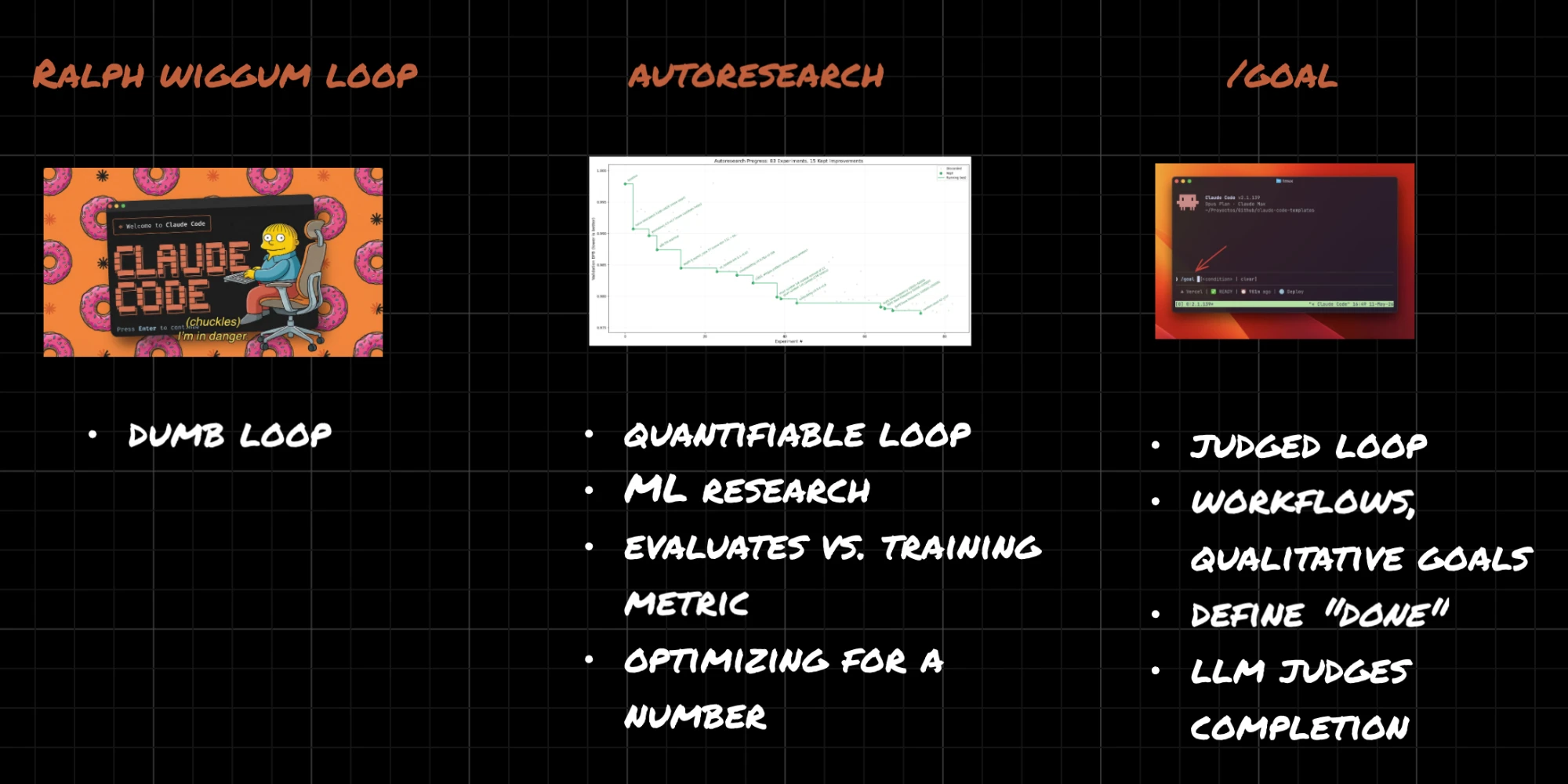
Three generations of the iterate-until-done loop.
The /goal command generalizes it. You state an outcome. Claude runs in turns, and at the end of each turn it evaluates its own work: have we met the criteria? If not, it runs again. You have two roles working together - one doing the task, one judging completion - looping until the bar is cleared. It’s built for any task you can’t confidently one-shot, where you’re tired of trading v1 for feedback for v1.1 for more feedback. (It runs in the terminal, not the desktop app.)
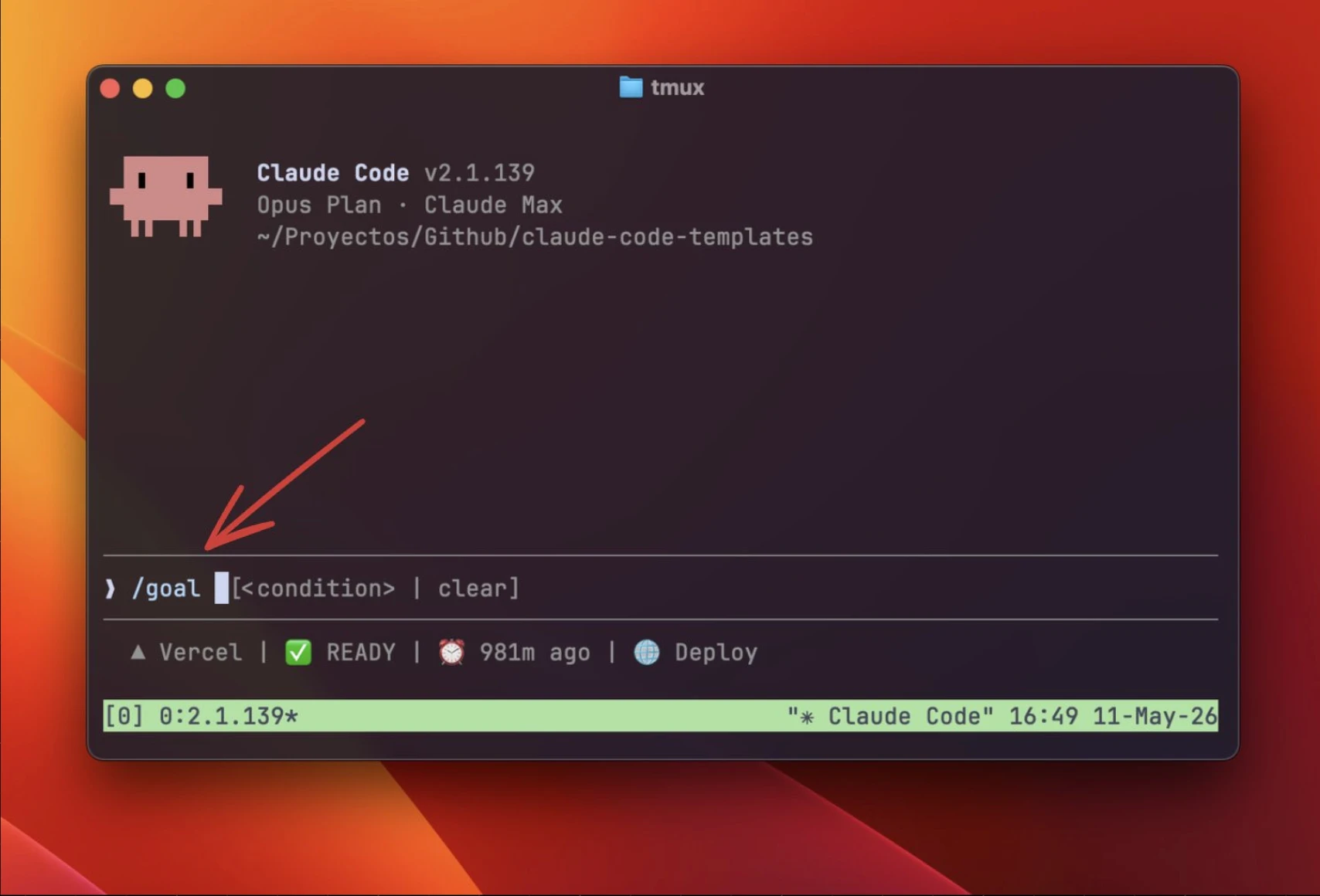
The /goal command: state the outcome, and it loops until the criteria are met.
Most GTM “testing” is one-dimensional: an A subject line and a B subject line, run for a week. That’s a slow way to learn and it forces you to keep sending the same kind of message.
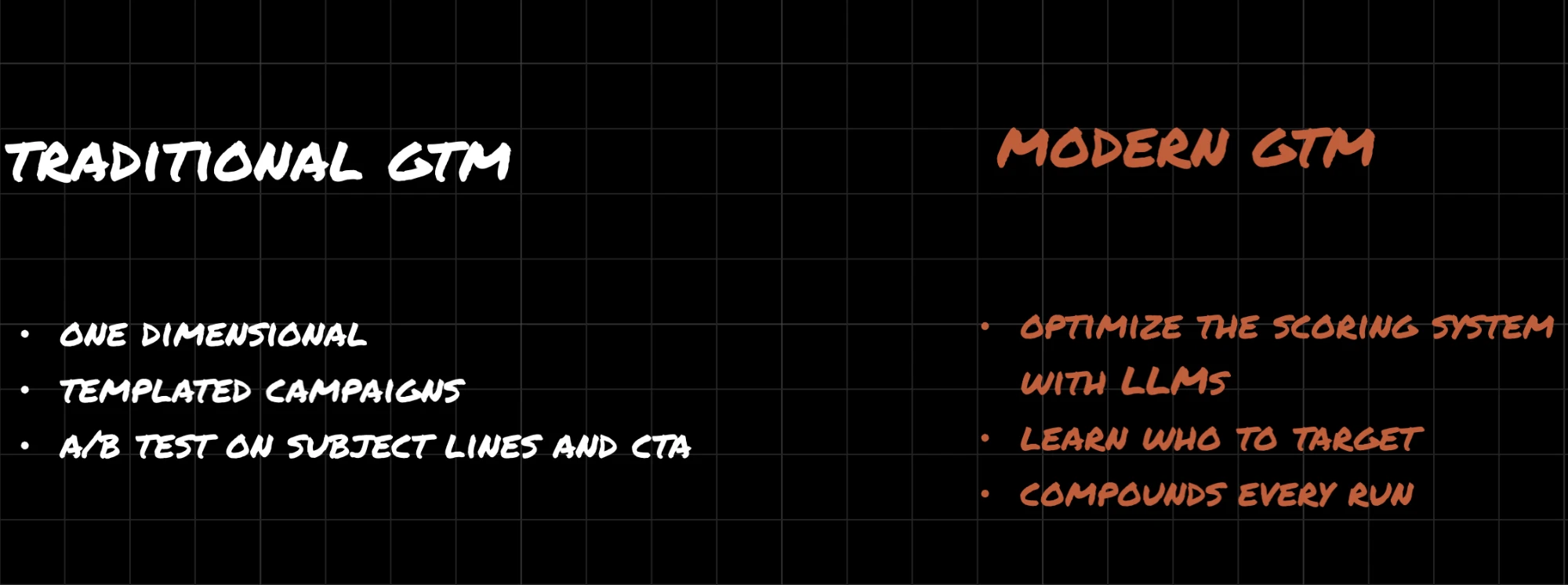
Traditional testing versus a scoring system that compounds every run.
Here’s a better use. We pulled a batch of replies from a past campaign through the EmailBison MCP and used /goal to make an LLM better at predicting which signals actually lead to a reply. Why? If the model can reliably say “this type of prospect responds and this one doesn’t,” you’ve found which factors are worth targeting - and you’re out of the shallow “was it the subject line” analysis and into the real question, which is whether your thesis about who to reach was right.
The data is messy and multivariate, which is exactly why no human team does this - nobody wants to sit and sift through replies. Run over many turns across more than a day, the loop surfaced things a person would take hours to find: funding is highly predictive of a response; rerun campaigns hurt; certain niche segments underperform the mean badly; and a founder posting about being “AI-native” on LinkedIn is only weakly predictive, because every CEO says that. The ideal end state is a model that can tell you funding is 80% predictive while the LinkedIn AI claim is 15% - and then you know where to point everything upstream.
No human team is doing the extent of what you can hand this loop. That’s the layer most GTM orgs are missing entirely.
Layer 6: Schedule (routines)
The last move is to stop triggering any of this by hand.
A routine runs a task on a schedule. In the Claude Code desktop app you create one, point it at a folder, write the instructions, and pick a cadence. Ours is a weekly prospecting run against the target companies in our prospect folder:
Research each company with subagents, then run
signal-builder, thenprospect-posts, thencreative-variable, thenemail-writer. Output an HTML file and a CSV of the results.
Set it for 9:00 AM Monday and it’s live. Every Monday the whole stack - find, enrich, contextualize, personalize - runs itself and leaves you a reviewable output. The layers you built by hand across many sessions now execute on their own, on a schedule, without you in the loop.
What actually matters
If you take three things from all of this, take these.
It’s not the model, and it’s not the prompt. Being good at prompting isn’t the differentiator anymore. The gain now is your ability to combine Claude Code’s primitives - subagents, MCP, skills, hooks - into systems that improve over time. The teams winning with AI aren’t the ones with the best prompts. They’re the ones with the best primitives, building the best systems.
It’s not about one-shotting. It’s about context. You want your team working from the best, most current context graph there is. Don’t be the org sitting on thousands of hours of sales calls nobody can use, or the marketing team whose battle cards are written from a sales-enablement hire’s memory instead of from what your salespeople actually said on calls last week. There’s no reason in 2026 to work the way you worked in 2016. The data is already in your Slack, your CRM, your sending tools, your call recordings. The question is whether you can build the context graph that makes it usable.
Operator taste is the scarce skill. When we hire GTM engineers, the thing we screen for is the ability to get models to do what you want - knowing when to wire in a specific piece of context, when to use a hook versus letting Claude decide, how much context is too much to hand a skill. That only comes from reps, from being opinionated, and from staying close to what your sharpest peers are doing.
Recap
Six building blocks, mapped to the work:
- Skills to find leads and to personalize
- Subagents to enrich at scale on the fewest tokens
- Hooks to pull the right context in automatically
- MCP to connect your external tools and call data
/goalto learn and improve against a real metric- Routines to schedule the whole thing
All of the skills covered here are open source. You can install them with one line:
npx skills add Zevenue/gtm-skills
Browse them on the skills page or read the source at github.com/Zevenue/gtm-skills. Watch the full walkthrough in the Claude Code GTM Masterclass. If you’re a founder or GTM leader who wants to build these systems, get in touch.
More on this: Claude Code for GTM, Part 1: Context Is the Bottleneck · Why Your GTM Team Hasn’t Adopted Claude Code · Applied AI in Your GTM Team